Hiddit · Case study · 2023–2026
Booking a court starts with a time
Hiddit is a court-booking platform for badminton, pickleball and tennis venues in Ho Chi Minh City. I founded it and was its only product person and designer, from field research to the public launch in September 2026.
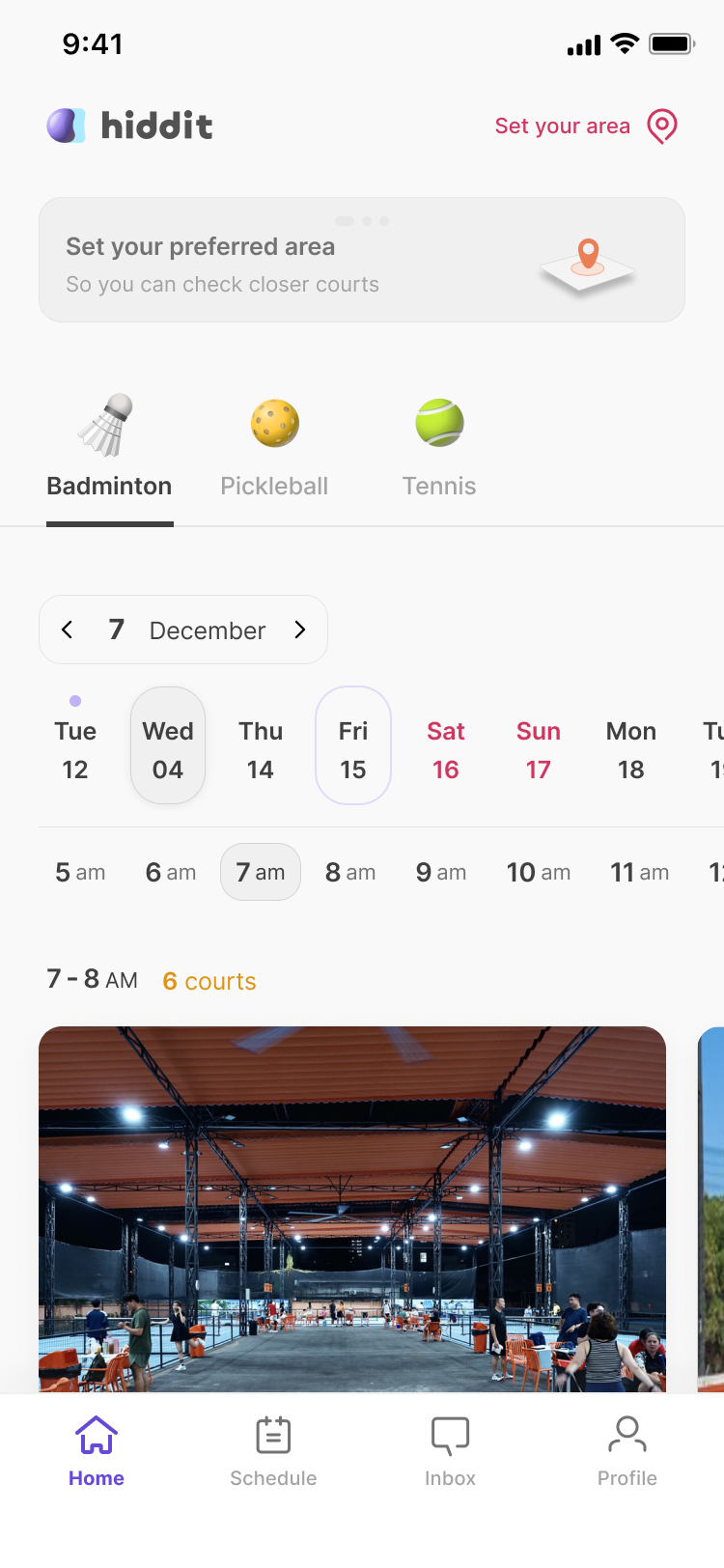
Players decide when before where
The home screen answers "What's open at 7 pm near me?" in two taps, instead of making players check venue after venue.
The money stays with the venue
Players pay the venue directly by bank transfer and upload a screenshot, so Hiddit never holds money. The venue accepts once it sees the deposit.
Venue tools fit the working day
A drag-to-select schedule grid, notification cards that say who and when, and coupons that bring a regular back.
Delivery I could vouch for
I directed a remote team with written specs, then ran development with AI coding agents, merging about 490 reviewed changes in four months. I held the public launch three months to fix booking bugs at the root.
01 · Context
How courts get booked in Saigon
A player who wants a court for 7 pm checks venues one at a time: in a venue's booking app, on Zalo or Facebook, or by phone. No single place shows which courts are free at that hour, and foreigners also hit a language barrier. I started Hiddit after going through this myself. Looking for a tennis court in Saigon, I contacted court after court, and by the time one said yes I had no energy left to compare price or facilities.
Venues run their schedules on spreadsheets or on Alobo, the market leader. One District 2 badminton venue shared its March 2024 booking sheet with me. About two thirds of weekday slots were empty, while most evening slots were held by regulars who book the same hour every week.
02 · Research
What players and venues told me
I did the research alone, alongside building: more than 100 conversations at courts with players, owners and staff, an early check with owners on whether they wanted anything new, and a competitor scan. The direction came from those conversations and from my own search for a court.
Players choose the hour first and the venue second, so the first screen should answer "What is open at this hour?"
I checked it later, after the home screen was designed and built, with a survey (a Vietnamese Google Form, Dec 2025 – Feb 2026) of pickleball players who had played at a court in the previous three months. It asked a scenario question: you want to play 7–9 pm tonight, which way is faster?
"You want to play 7–9 pm tonight. Which way is faster?" (n = 53)
Among the 45 who had recently booked a court themselves, 60% chose time first.
Biggest pains when booking (up to two picks, n = 53)
Of the 45 recent bookers, 31 looked at three or more courts or screens before booking.
Venues were a different story. In that early check, about half the owners said they didn't need anything new, and the other half said "why not, if it helps business." Players who host long-term group bookings felt the same way, because they already had a court.
Separately, in an informal side-by-side, I showed ten players in their thirties or younger both apps, and eight preferred Hiddit overall. It measured preference for the whole app, not time-first specifically, and the sample is small, so a task-based test is on the plan (see Learnings).
03 · Time-first home
A date × hour list of open courts
Alobo starts with the venue: you pick one, then read its calendar. It has a time search, but it sits inside a filter. I made time the first screen.
Home is a date strip and an hour strip over 19 one-hour rows, 5 am to midnight, Vietnam time. Each row reads "7 - 8 PM · 6 courts" and holds a carousel of venues with a free court at that hour, each priced at its cheapest open court. Hours that have passed today disappear, even on a phone set to another time zone.
Which venue comes first within an hour
I wrote the ranking as an explicit policy in April 2025 and revised it in August 2026, so it could be tested instead of living in someone's code:
- Venues that gave this player a coupon valid today
- Favorites, most visited first
- The cheapest open court in that hour
- Review score: number of reviews × average rating
- The venue that joined Hiddit earliest
Personal signals sit above price on purpose: a coupon or a favorite only pays off for a venue if it changes what that player sees first. Putting coupon venues first applies only to the player who holds the coupon, so it is never paid placement. A venue repeats in every hour it has a free court, which I accepted because the player's question is about the hour. Multiplying the number of reviews by the average rating stops a single 5.0 review from beating forty reviews at 4.7, but it also lets volume beat quality. With few reviews at launch the formula is untested; if it ranks venues badly, a weighted average is the fallback.
"Near me" means districts
Players choose areas on a hand-drawn map of the city's 37 districts. Districts Hiddit hasn't opened yet stay on the map but are disabled, so players can see where Hiddit is available so far. Hiddit staff open districts one at a time from the admin console. When request logs showed first sign-ups landing on an empty home because they never saved an area, I set a rule that new accounts start with every open district selected, as long as eight or fewer are open.
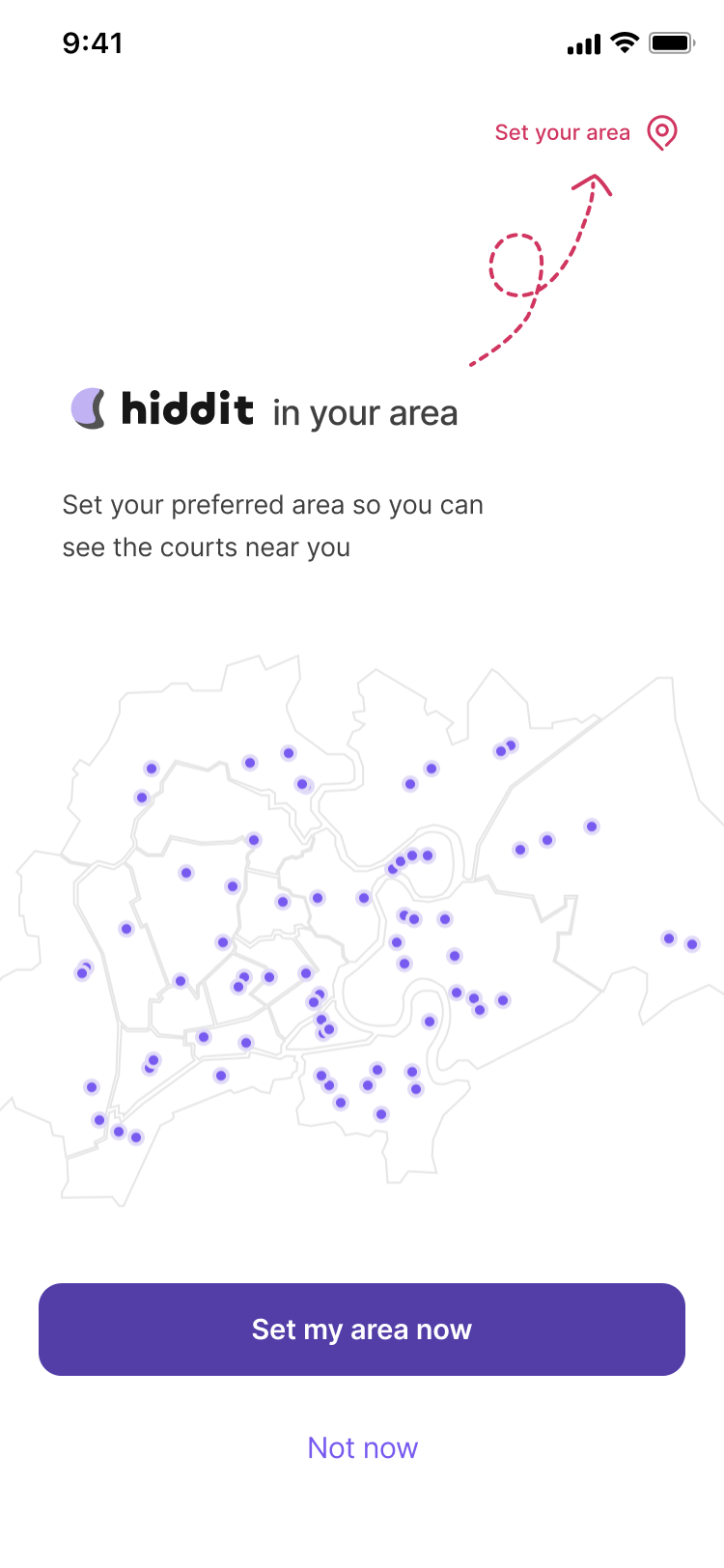 First run
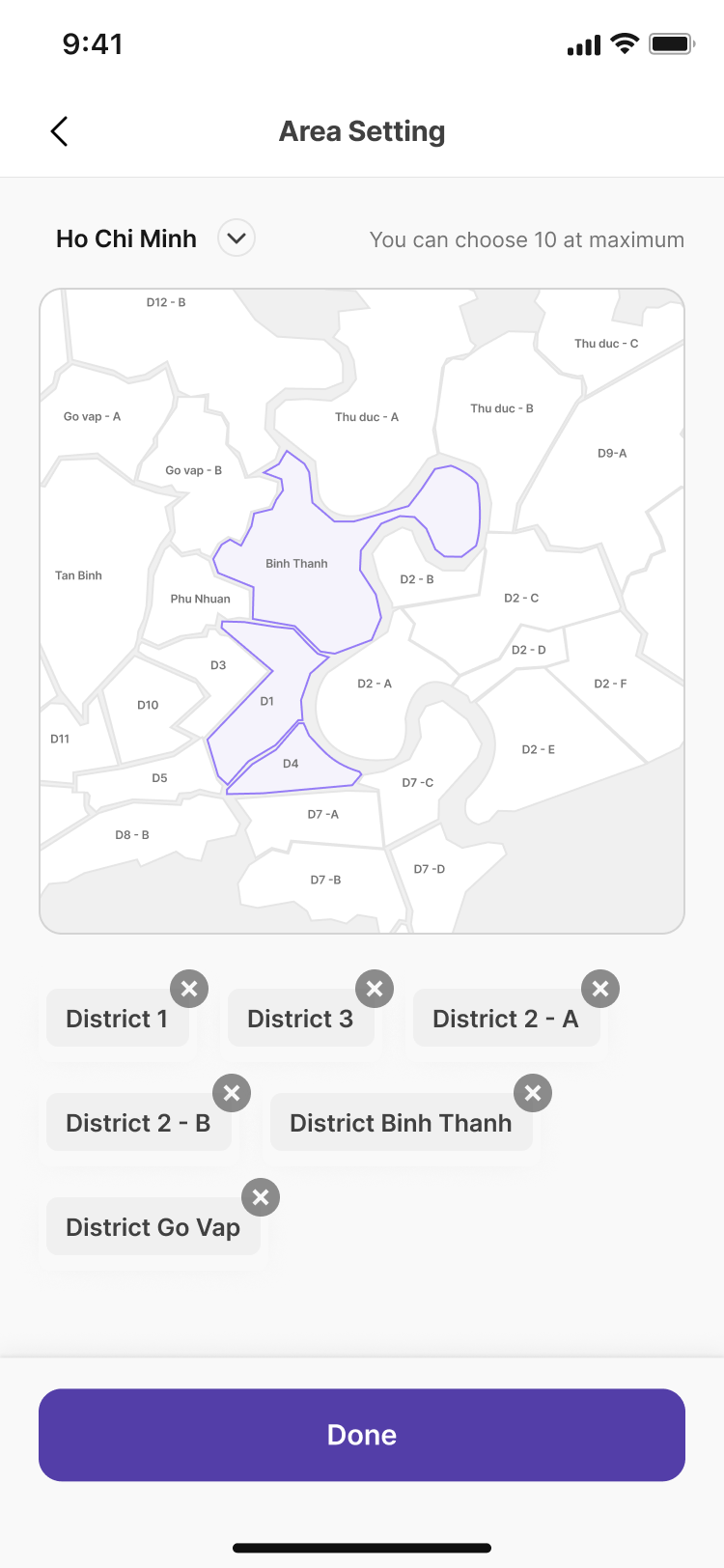 Area setting
04 · Court detail
Picking an hour and a court without price surprises
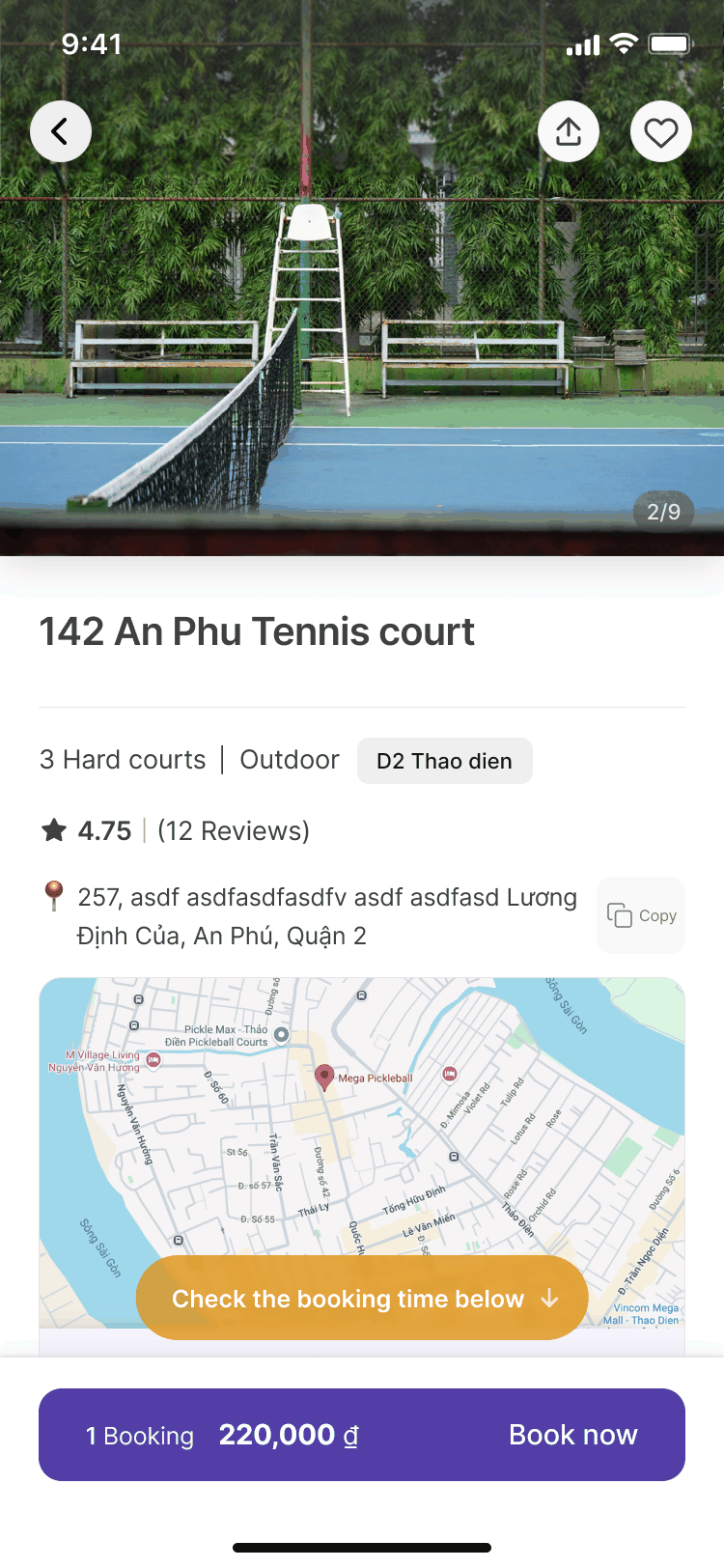
Venues price courts differently. In the first version a player picked an hour, then opened a separate court sheet. The default was the first free court by number and the row showed a single price, so a player who added a second court expected 2 × 50,000 = 100,000 ₫ and saw a total of 130,000 ₫ (50,000 + 80,000). The home card could also advertise one price while the detail screen preselected a different court.
The court grid unfolds under the selected hour: one button per court, six to a row, in four states: Enabled, Selected, Sold out, Not posted. Choosing an hour selects the cheapest free court, the same court the home card priced. Prices always show in full, and the row shows the sum of the selected courts.
Price is what players compare, so every court's price and availability sits where the hour is chosen. Keeping hour, price and courts in one place makes the page longer. The hour rows sit below a tall photo and are easy to miss, so a floating "Check the booking time below" pill appears on entry and scrolls to them when tapped.
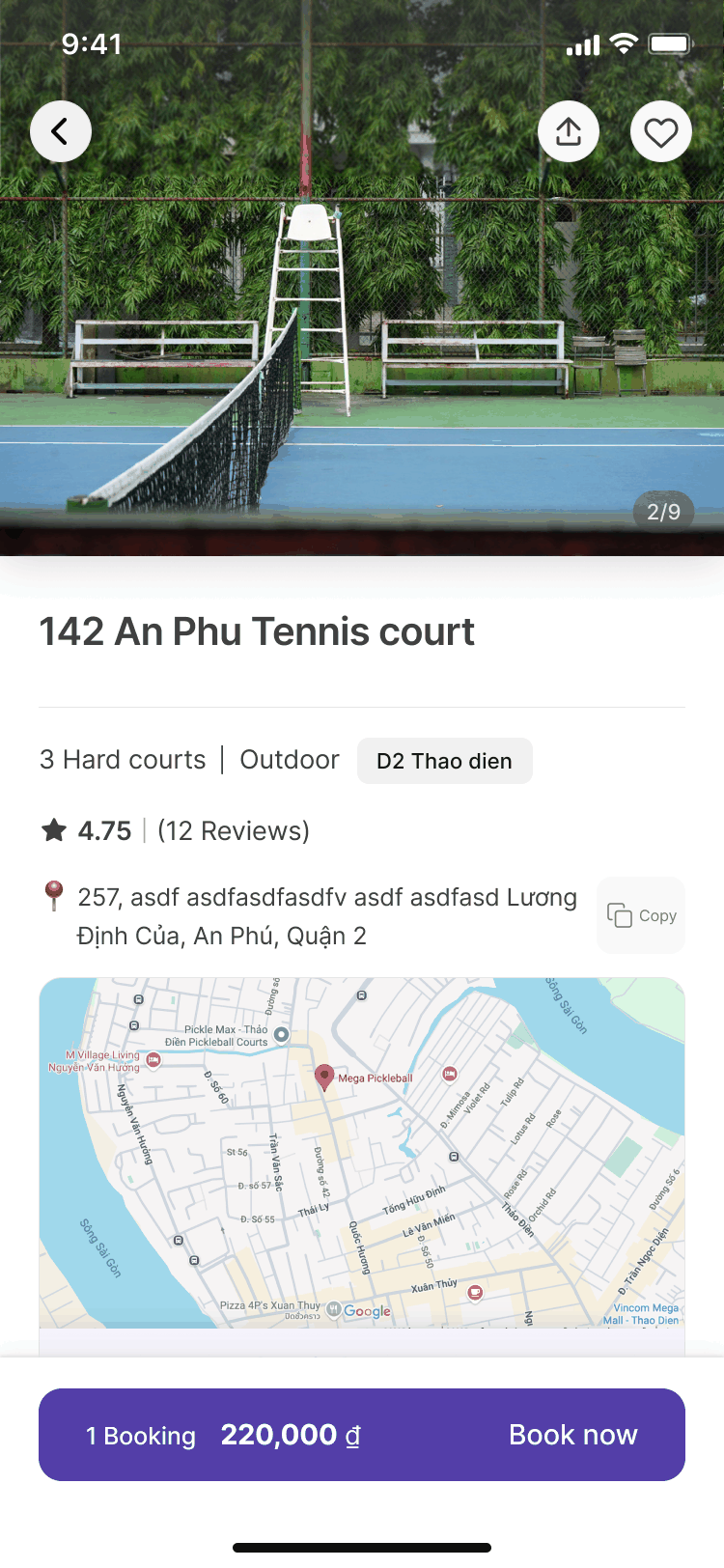 Before
 After
After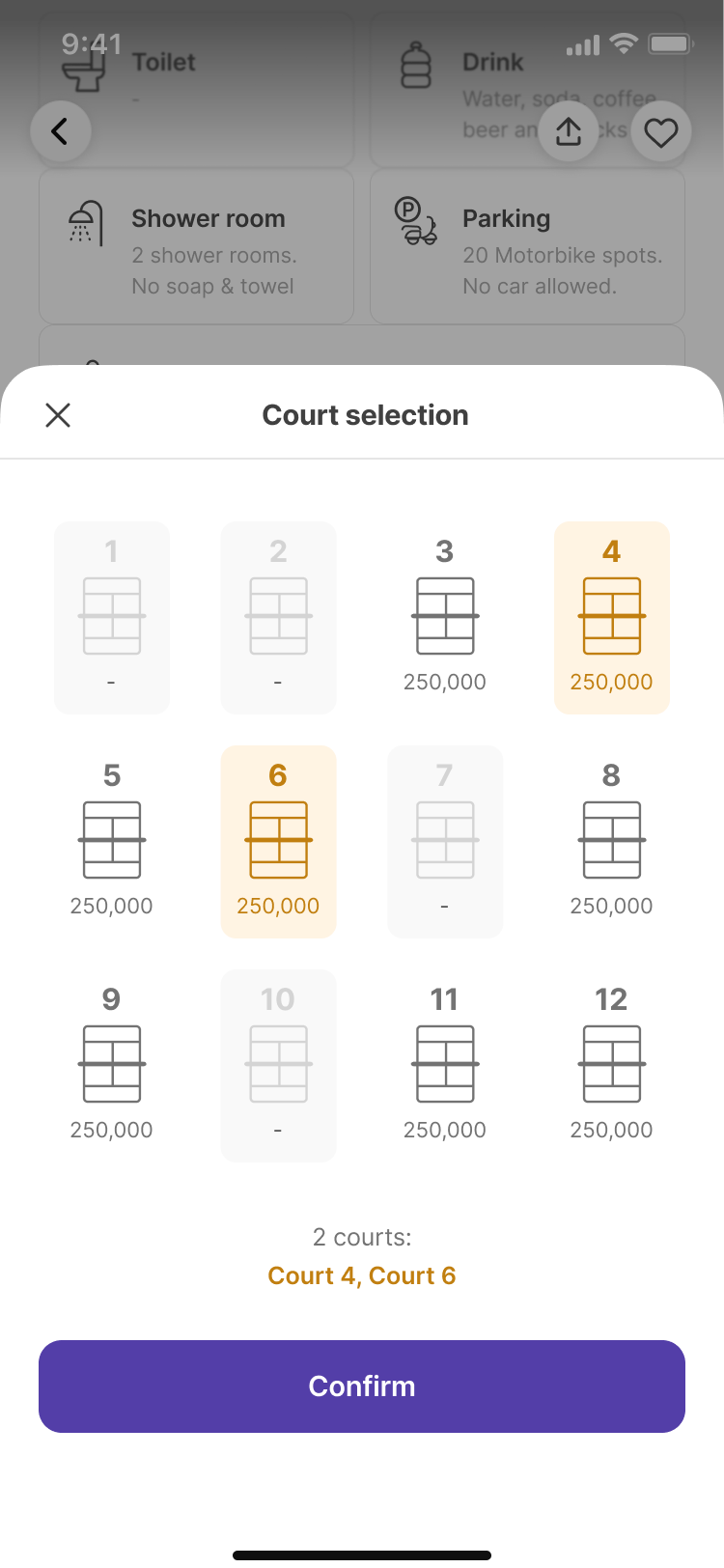 Earlier sheet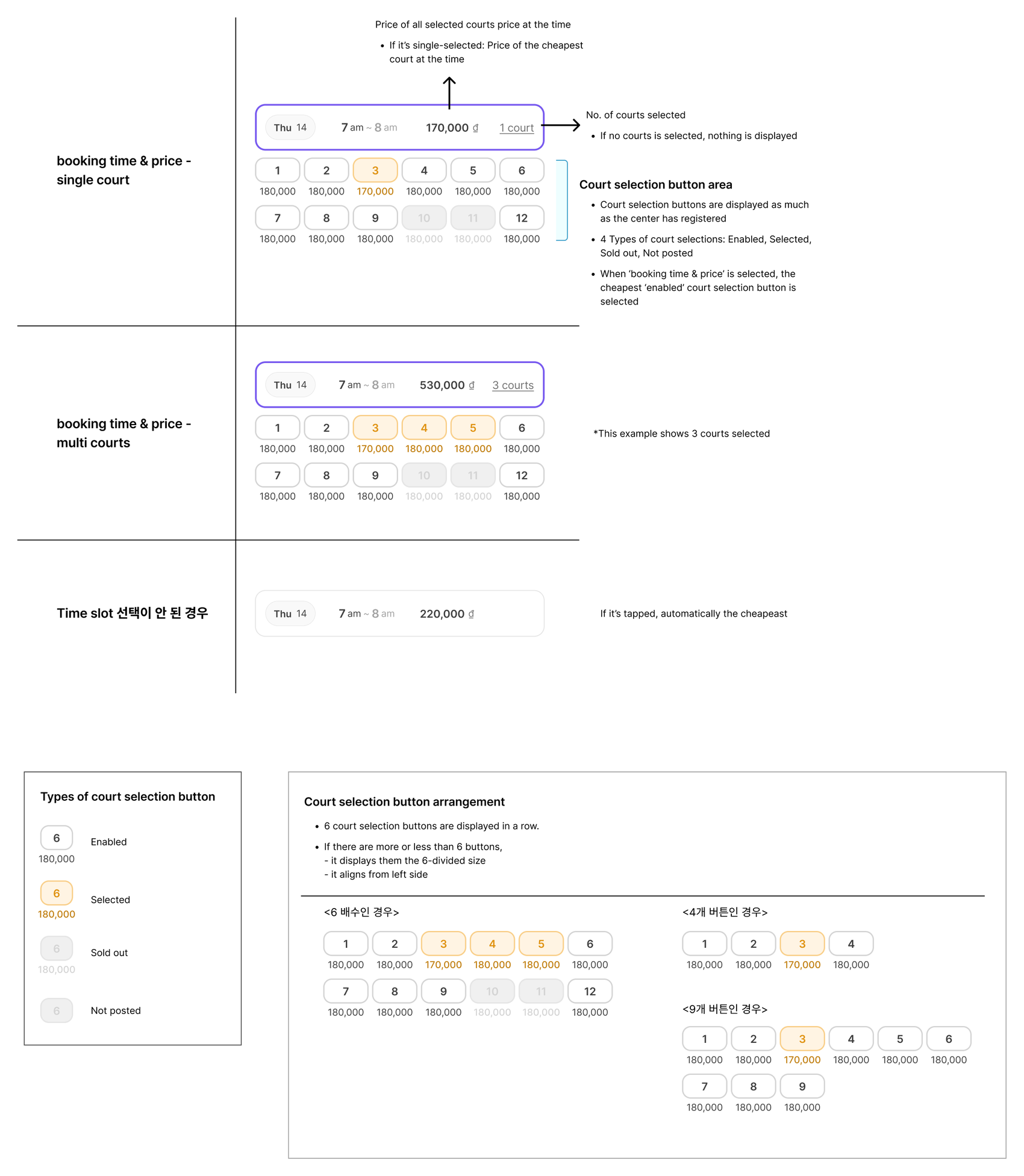
05 · Payment & approval
The money never passes through Hiddit
Players pay by bank transfer to the venue's own account, usually by scanning the venue's bank QR in a banking app, and then show a screenshot. I kept that habit instead of adding a payment gateway: no fees, no license, no custody of money, and a flow players already know. The cost is that it is slower, depends on a person, and a screenshot can be faked.
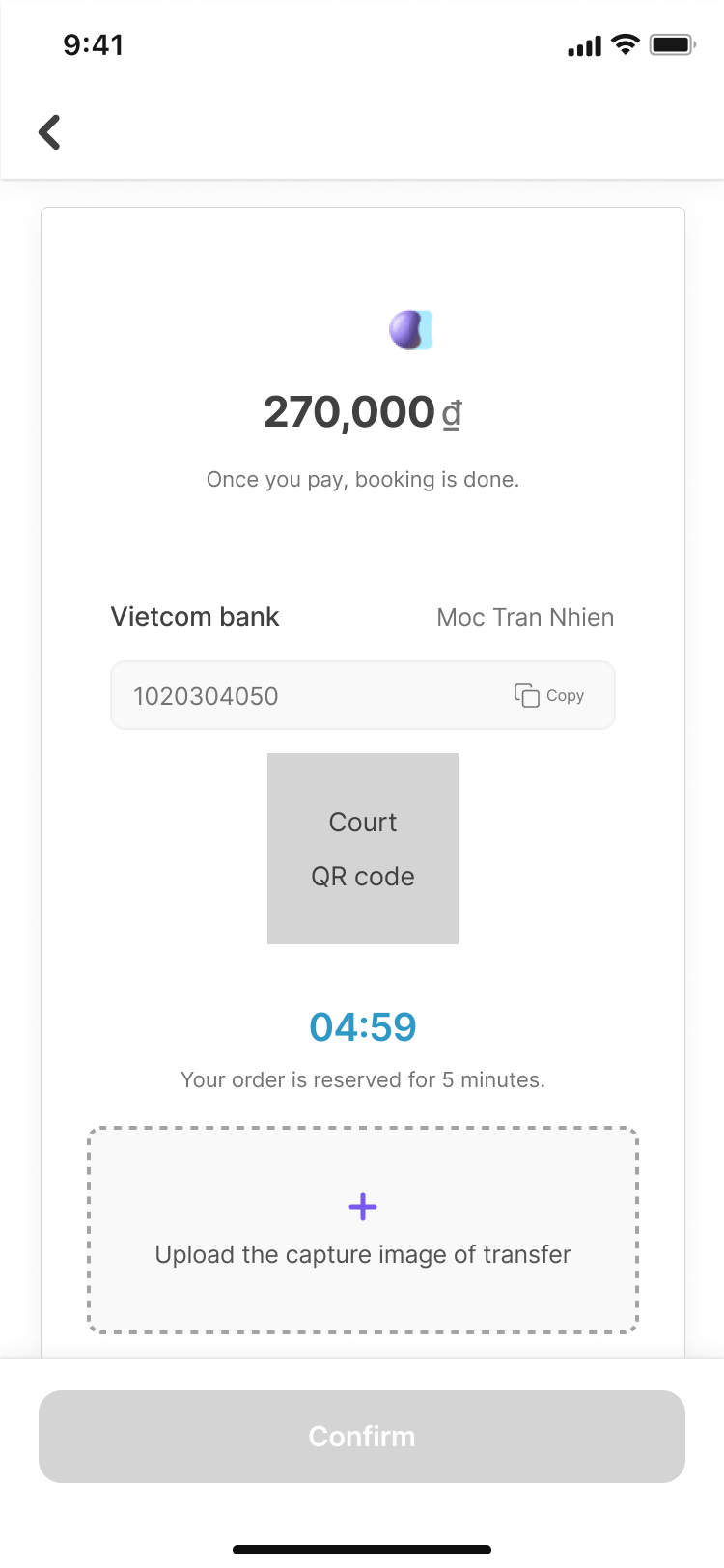
The payment step shows the price; the venue's bank name, account holder and account number, with a copy button; the venue's QR code; a 5-minute hold timer; and an upload zone for the screenshot.
Venues accept before a booking counts
Until September 2026, uploading the screenshot confirmed a booking at once, and venues checked their bank afterward. Our first partner venue's owner asked to confirm only after seeing the deposit. I respecified the lifecycle so every booking, paid or by coupon, becomes a request the venue accepts or rejects.
A request can't wait forever. It expires 24 hours after it is made or when the game starts, whichever comes first, and a last-minute request always gets at least five minutes. That five-minute floor is my rule. Venues that don't answer get reminders that thin out over time, plus a last call before the request expires. My first draft reminded every two minutes; I took the agent's backoff schedule instead.
Reminders for a request made at 18:00 for a 20:00 game (drawn to scale)
On the player side, "Requested" says what happens next in plain words: "Court owner will check this request in a few minutes," followed by the two conditions for automatic cancellation. Rejected and expired share one neutral "Failed" state, so the copy never blames the venue, and it carries a refund guide because the refund has to come from the venue. Players can't cancel a request themselves. They use the chat instead, which opens as soon as the request is made.
 Pay
Pay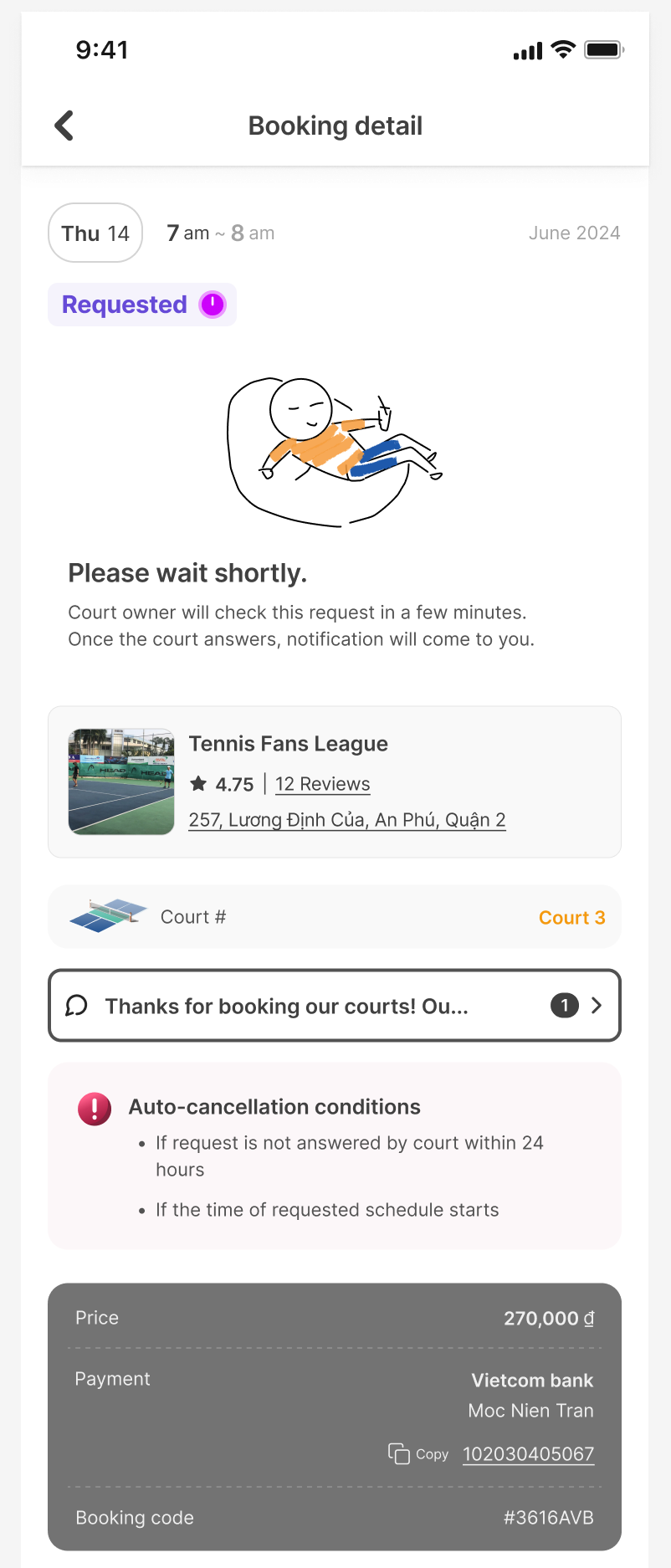 Requested
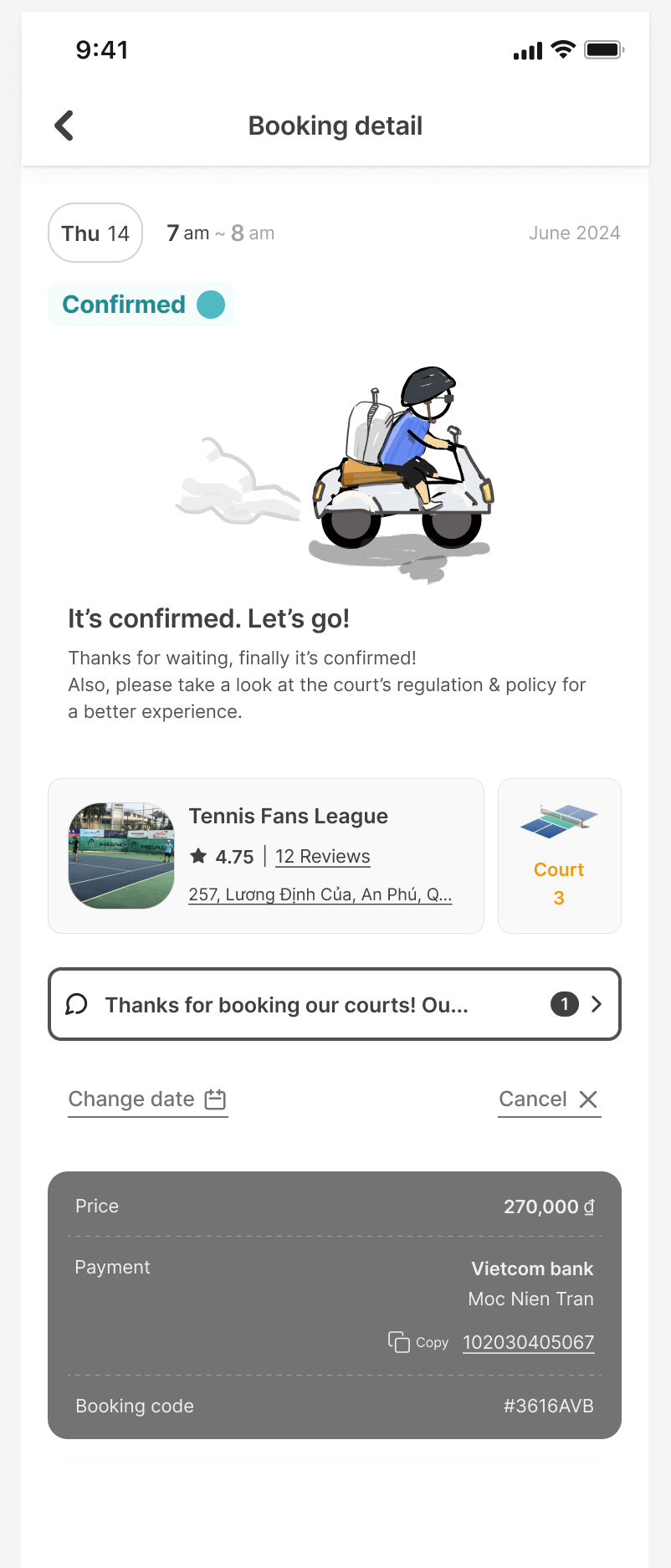 Confirmed
On the venue side, the same request appears in five places: the schedule grid, a push notification, a notification card with Accept and Reject buttons, a drawer with the transfer screenshot and the player's visit hours, and the chat. Accepting takes one tap. Rejecting asks for confirmation, because the player has usually already paid.
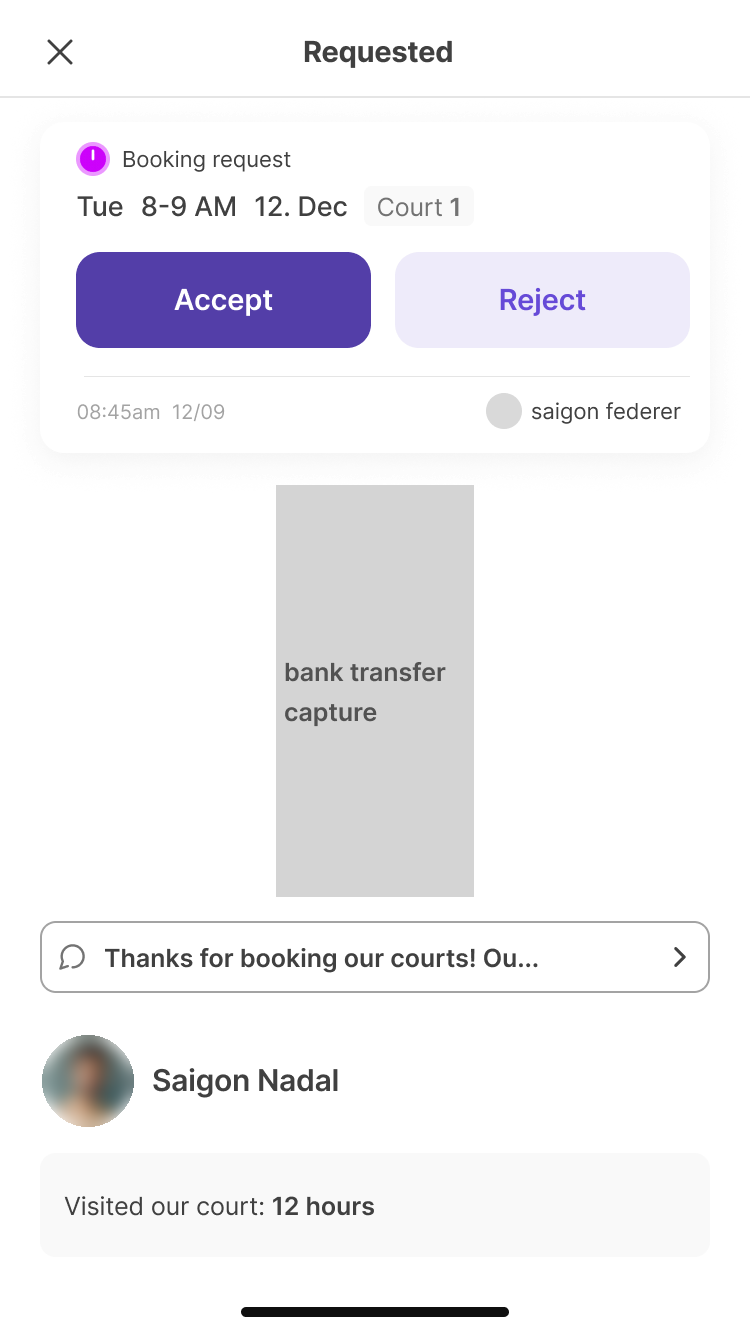 Venue drawer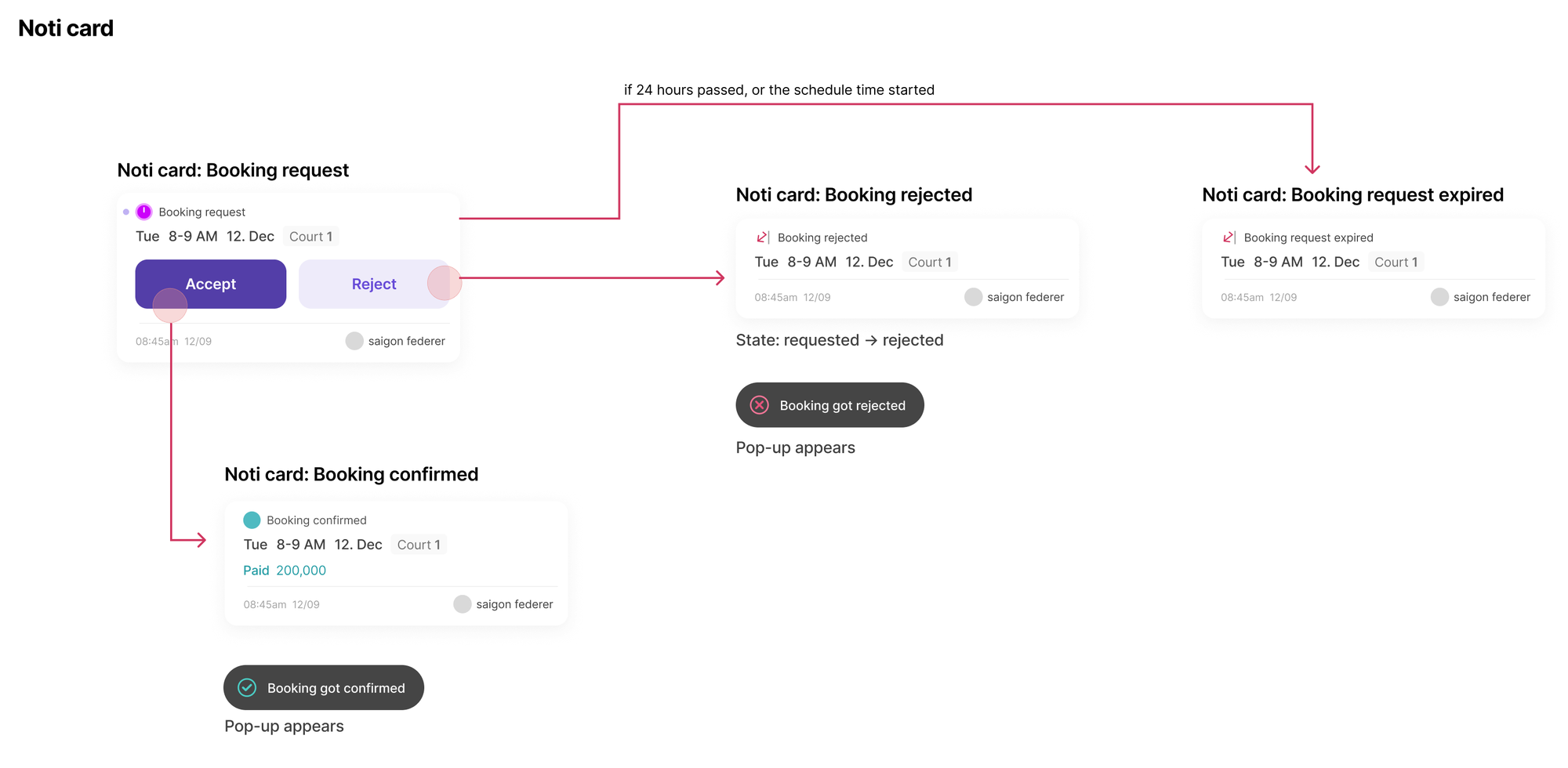
Approval adds a wait for a player who has already paid. I bounded it in time, pushed venues with reminders, and kept a way out through chat. Later I saw that the same step lets a venue that also sells on Alobo post an hour on both, and reject on Hiddit if it sells there first. The cost lands on a player who has already paid and must wait for the venue's refund. That is why Failed carries a refund guide, and why this co-listing still has to be validated with venues.
I'd add quiet hours, because a request made a day ahead can remind managers every 30 minutes through the night. And the Reject confirmation always says the customer has already transferred the money, even on coupon requests, which need their own copy.
06 · Venue app
Built for the grid they work on all day
The venue app's schedule is a grid of courts × hours, and it is where staff spend their day. Posting prices meant tapping empty cells one by one, and taking an hour off sale meant opening each cell's drawer. Once a venue sells the same hours elsewhere, it needs to take several down fast.
Long-press a cell, feel a haptic tick, then drag a rectangle. The first cell sets the intent: an empty cell means post prices here, a posted cell means take these down. Booked, requested and locked cells can never be part of a drag. Removing asks for confirmation, and the result is reported honestly: "3 open slots removed," or "2 removed — 1 kept (just booked or already changed)" when a player books during the gesture.
The cost is discoverability: nobody finds a long-press by accident, so venue onboarding has to teach it. Customer bookings stay tap-and-drawer only, so a sweep can never cancel someone's paid game. This model came out of working sessions with the AI agents, and I approved it. It worked on my iPhone and silently did nothing on Android for two weeks, because I had only verified it on iOS. That is the lesson I took: a gesture needs a device check on both platforms before it ships.
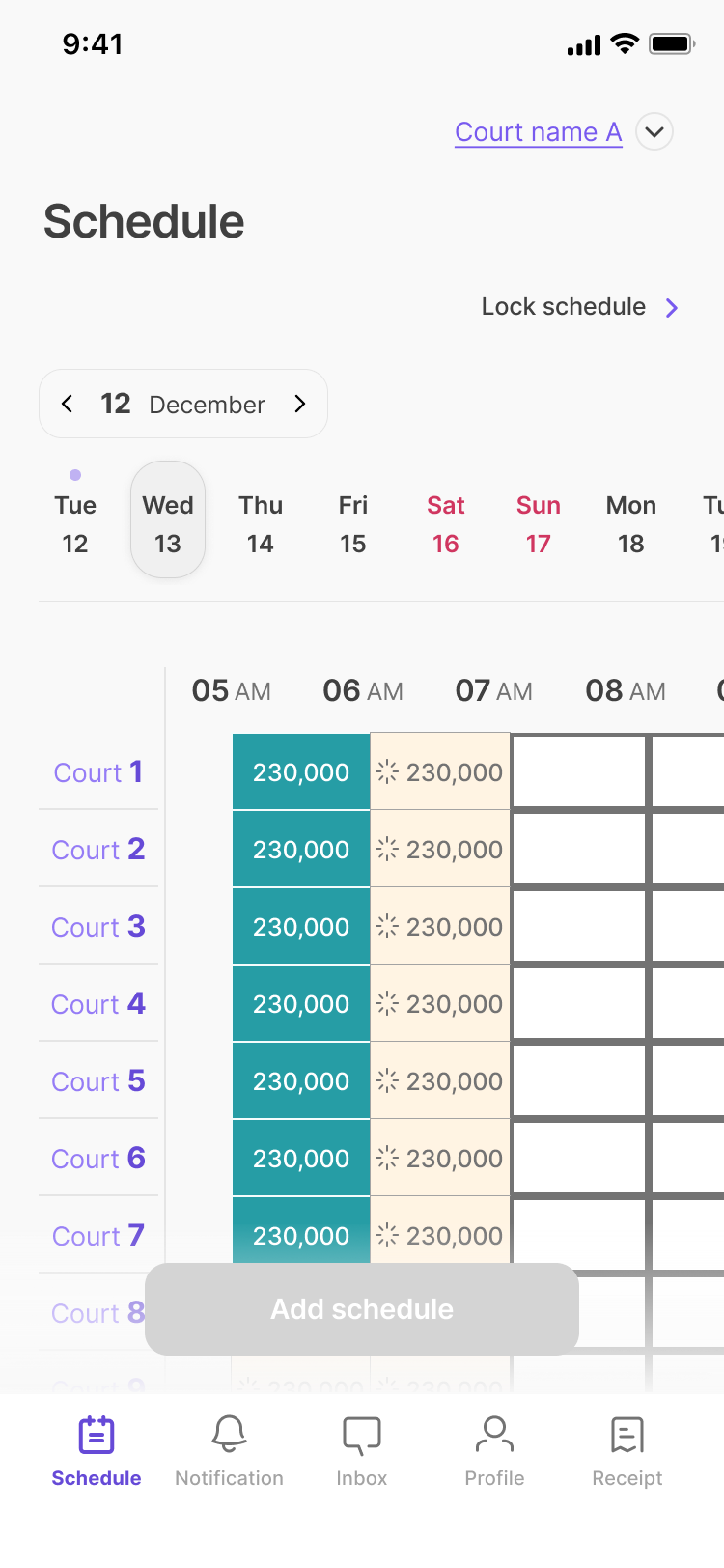 Schedule grid
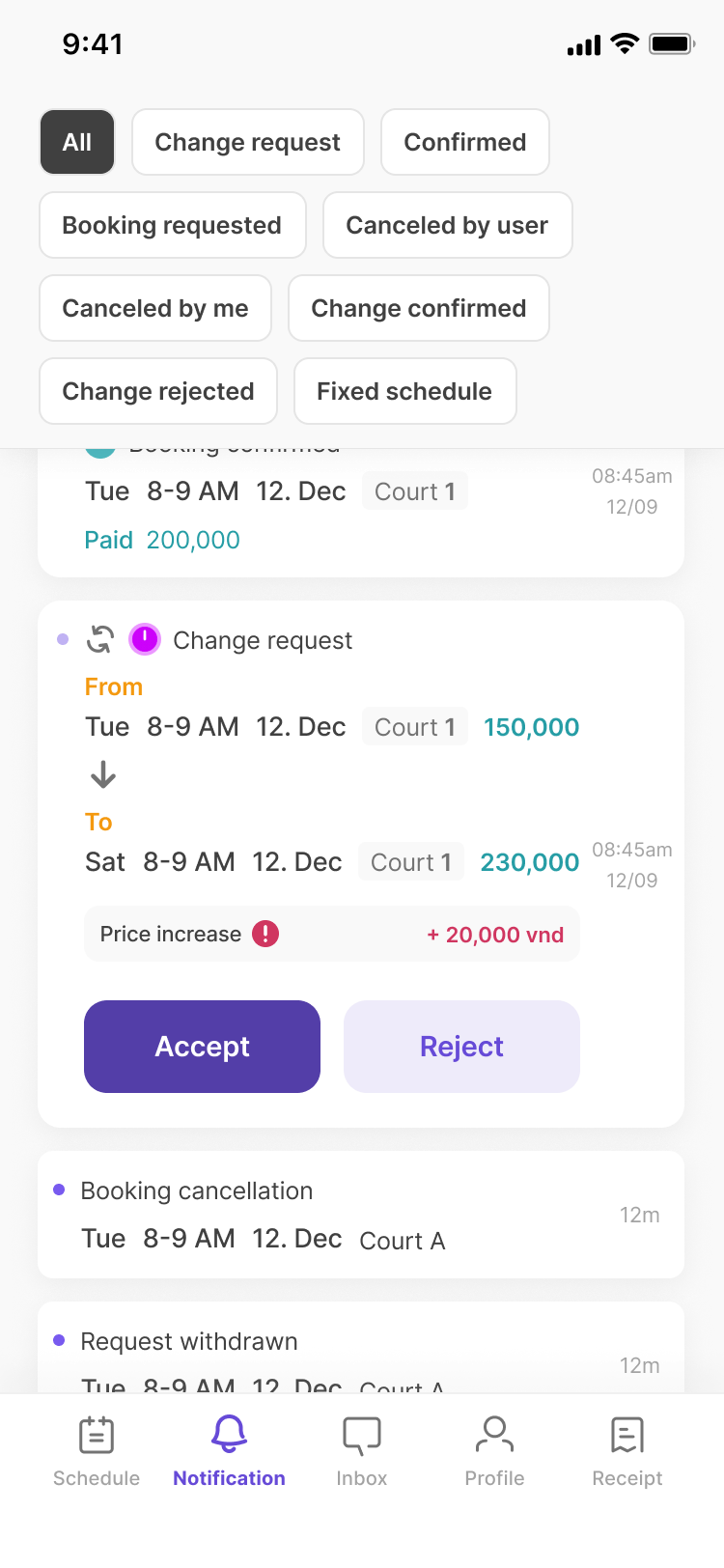 Notifications
Who is this about?
My first notification card spec showed the booking state, time, court and payment, but not who the booking was for. To tell a regular from a first-timer, a manager had to open card after card. Over three Figma rounds in three days (14–16 Aug 2026) every card variant gained the booker's name and avatar, and the event time moved into a single footer line. I stopped at those two fields, which are enough to recognize a regular without putting more personal data in a list. The list now sorts by latest activity, so a fresh cancellation of an old booking rises to the top.
Three visitors, three doors
The venue app is invite-only. Hiddit creates each account, a new manager verifies a phone or email to claim it, a returning manager signs in, and an owner who isn't registered needs to contact us. The old welcome screen put all three situations in one column of text. The new one gives each its own card.
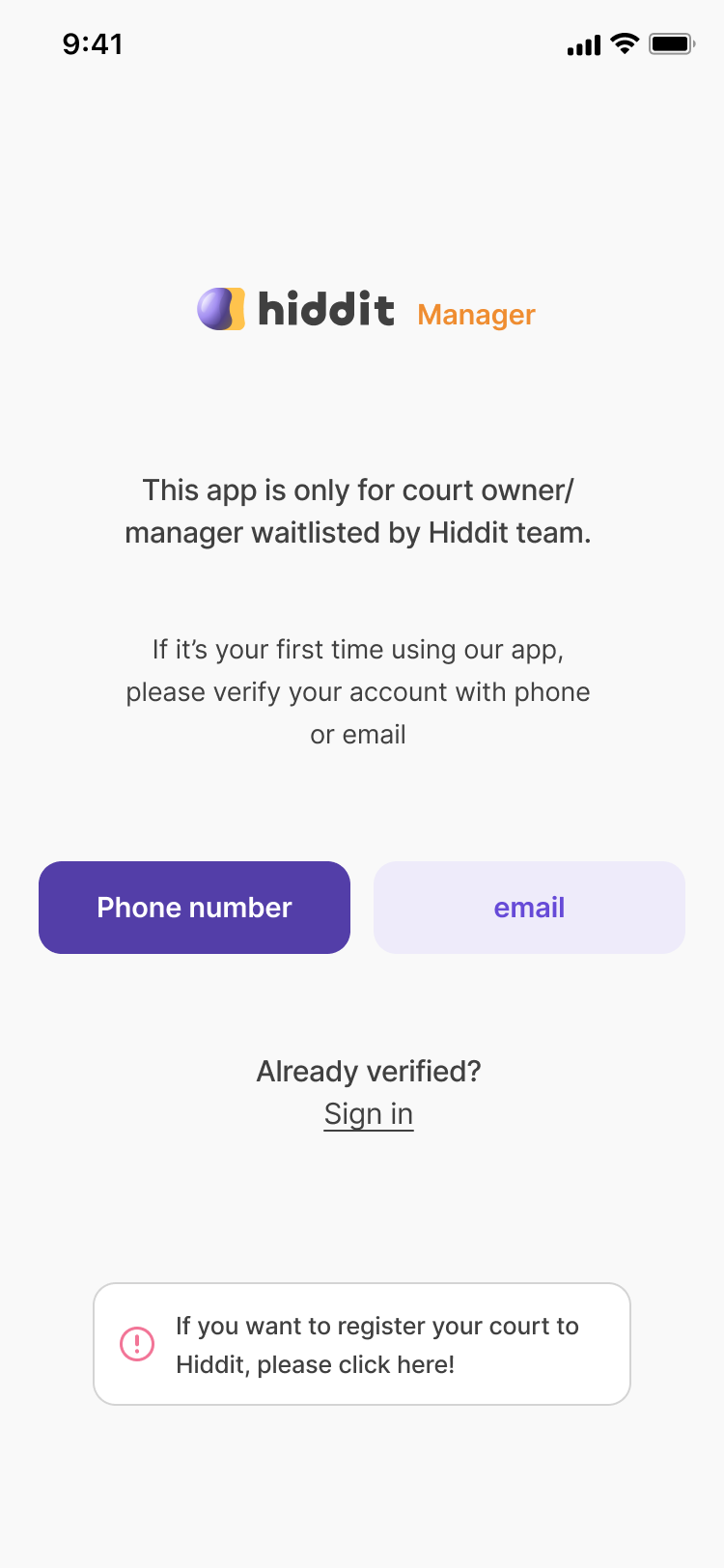 Before
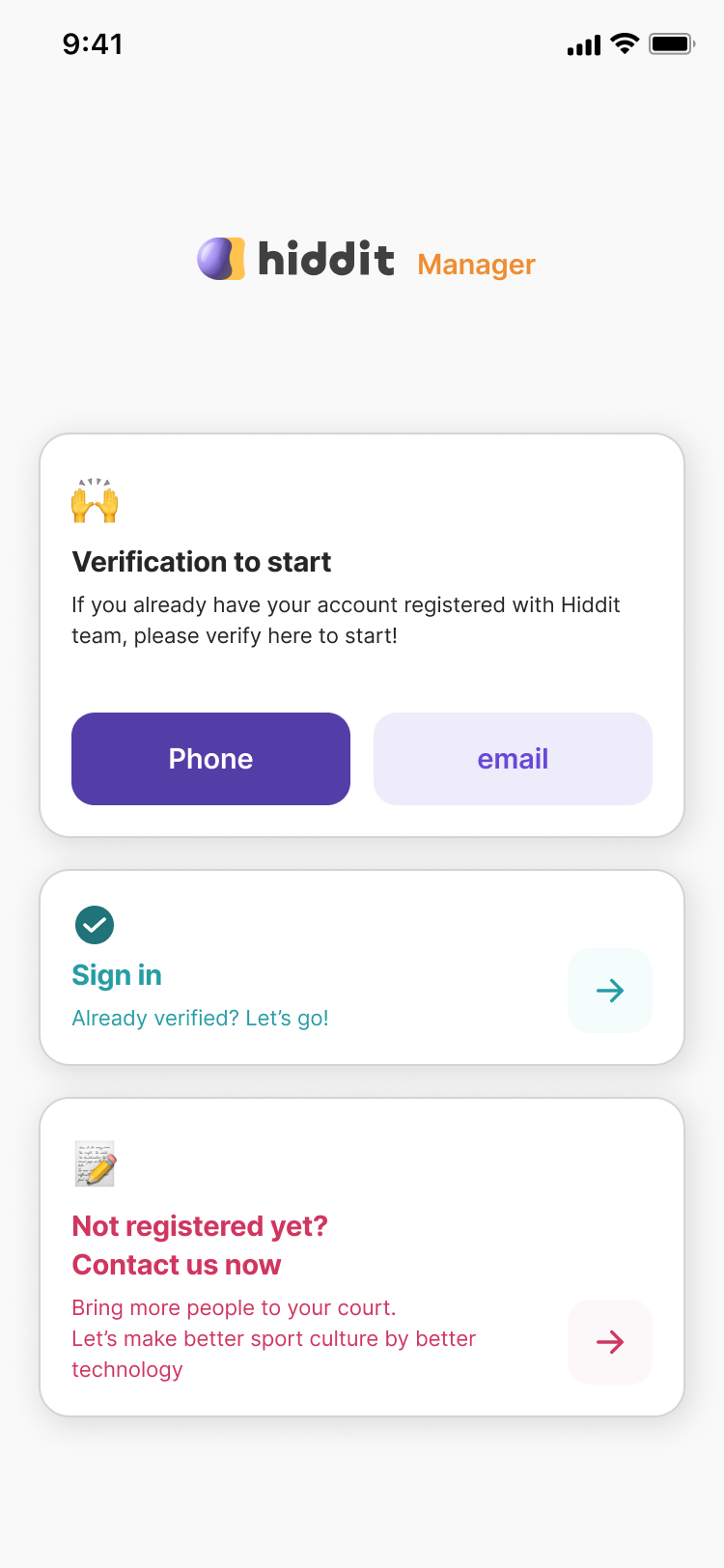 After
AfterBringing regulars back
Owners care more about regulars than one-off bookings. The venue app has a member list sortable by bookings, coupons or favorites. A coupon is one free hour with a validity of 5 days to 30 days. Each booking drawer shows one stat: "Visited our court: 12 hours." I cut the other stats. One was labeled platform-wide but counted only this venue, and a true platform-wide figure would have shown a player's visits to competing venues.
A coupon only works if the player sees it when choosing. On Hiddit that moment is the home list, so a venue that gave a player a coupon rises to the top of that player's list for the hours the coupon covers. The venue sends a coupon, the player sees that venue first and books, and the visit hours add up in the venue's drawer.
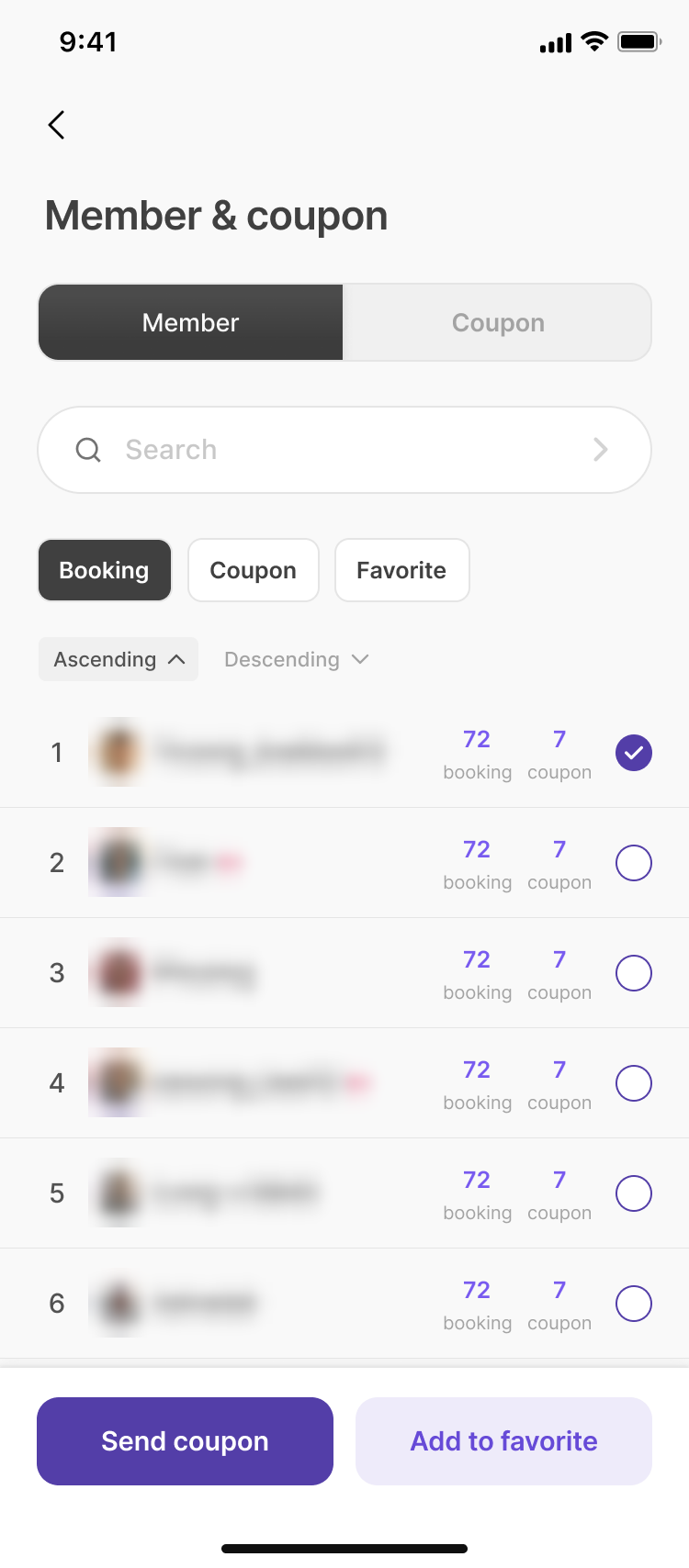 Members
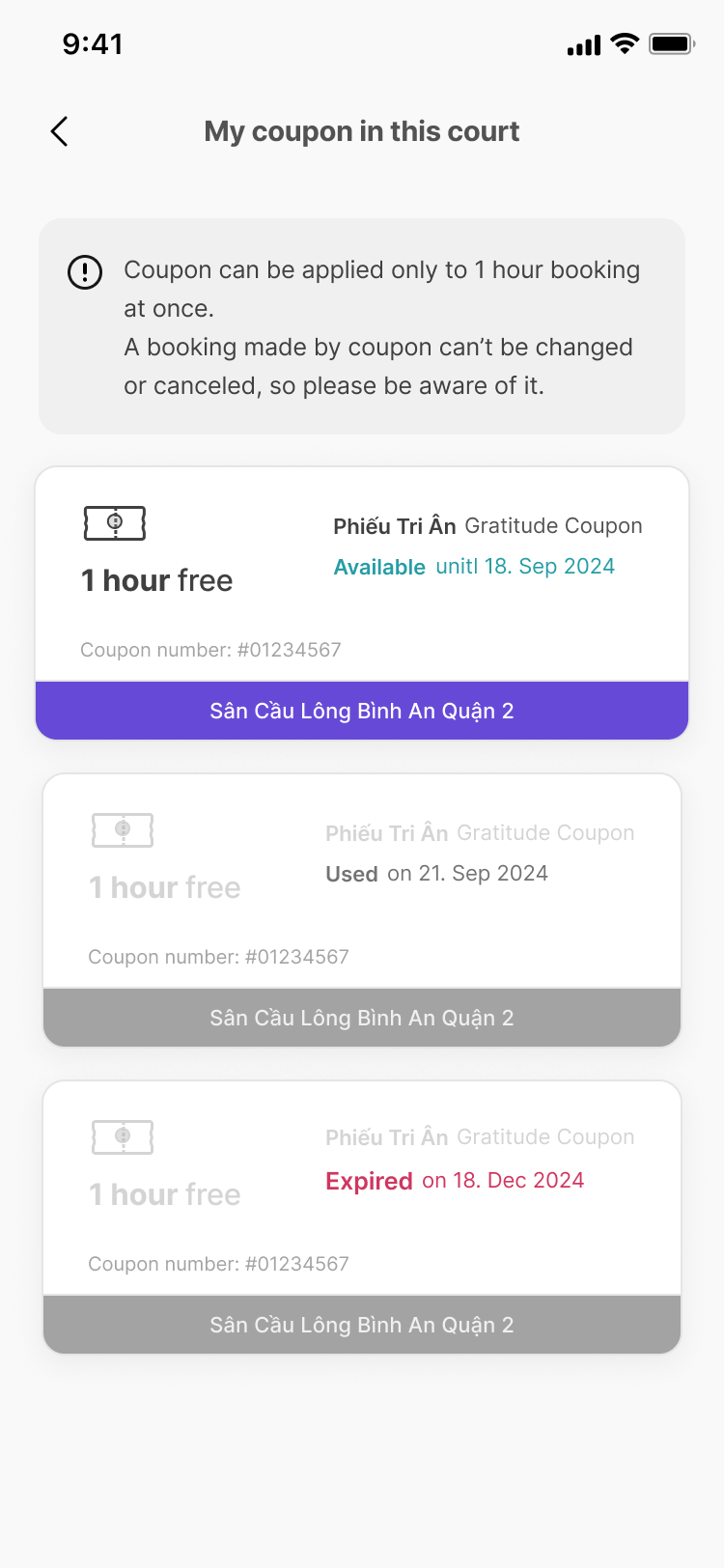 Player coupons
In September 2026 I added coupons funded by Hiddit, sent from the admin console to a venue's past visitors. My first idea was a coupon worth up to 200,000 ₫ where the player pays the difference. Walking it through the booking flow showed that paying the difference was the hardest part, because the venue would have to verify the coupon and a partial transfer together. I chose a simpler rule instead: one free hour, usable only on slots priced at or below a cap that Hiddit staff set for each batch. I settled the open rules by answering a nine-question checklist the agents prepared, reviewed AI-drafted frames built from my own component library, and chose the final copy. It went live across the backend, both apps and the admin console five days after the requirement was set.
07 · Small fixes
Smaller fixes that removed dead ends
From guest to sign-up without losing the court
A guest who found a time they wanted had to sign up, then find the court again. Guests now see a court's real availability for the day, without anyone's personal data, and the booking bar becomes a single "Sign up & Book now" button. Whichever of the five sign-up and sign-in paths a guest finishes, they return to the same court. Onboarding is phone-only, because social logins still needed a phone check and only added steps.
One card per booking
The schedule tab showed one card per court-hour, so a normal two-hour booking became two near-identical cards with no total. It shipped in September 2026 as one card per checkout, with the total and the uploaded screenshot.
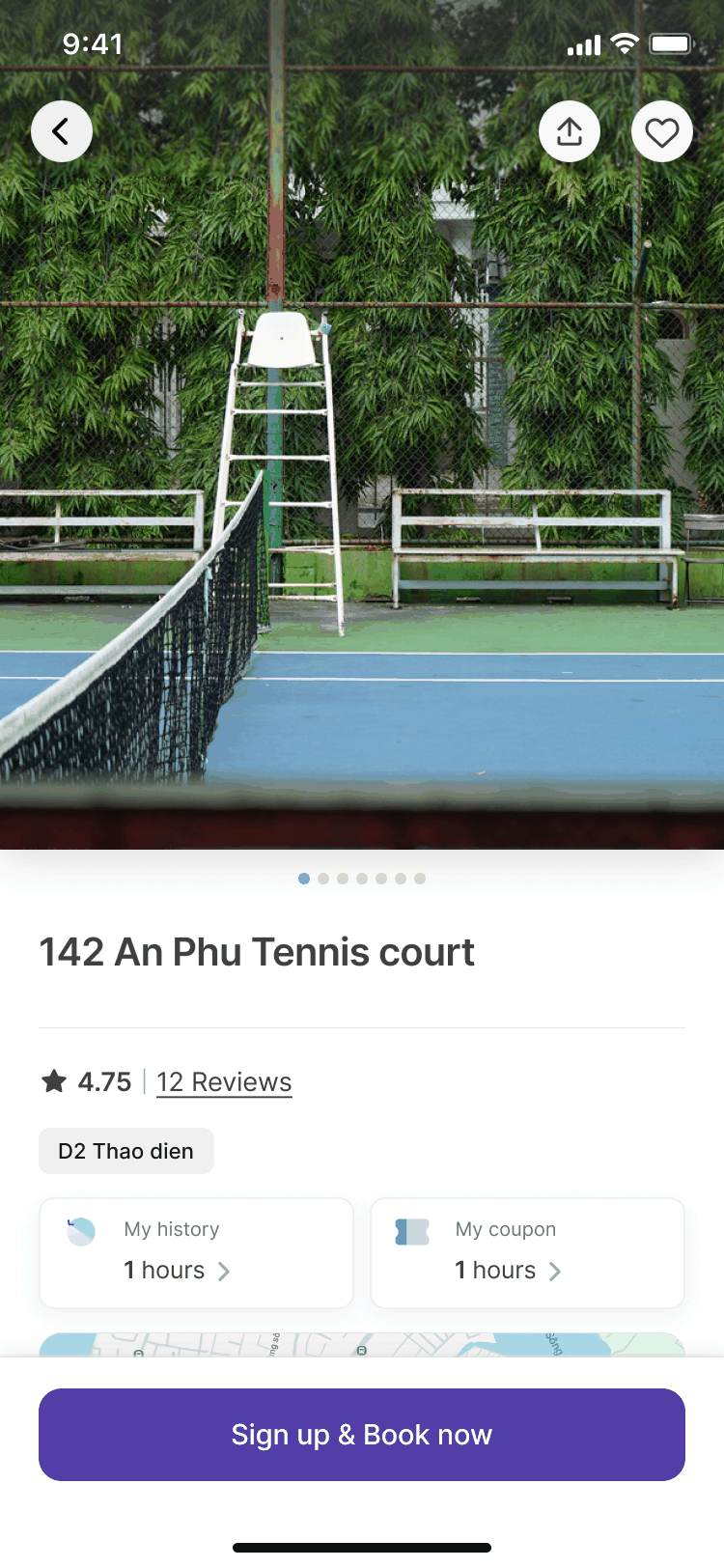 Guest
Guest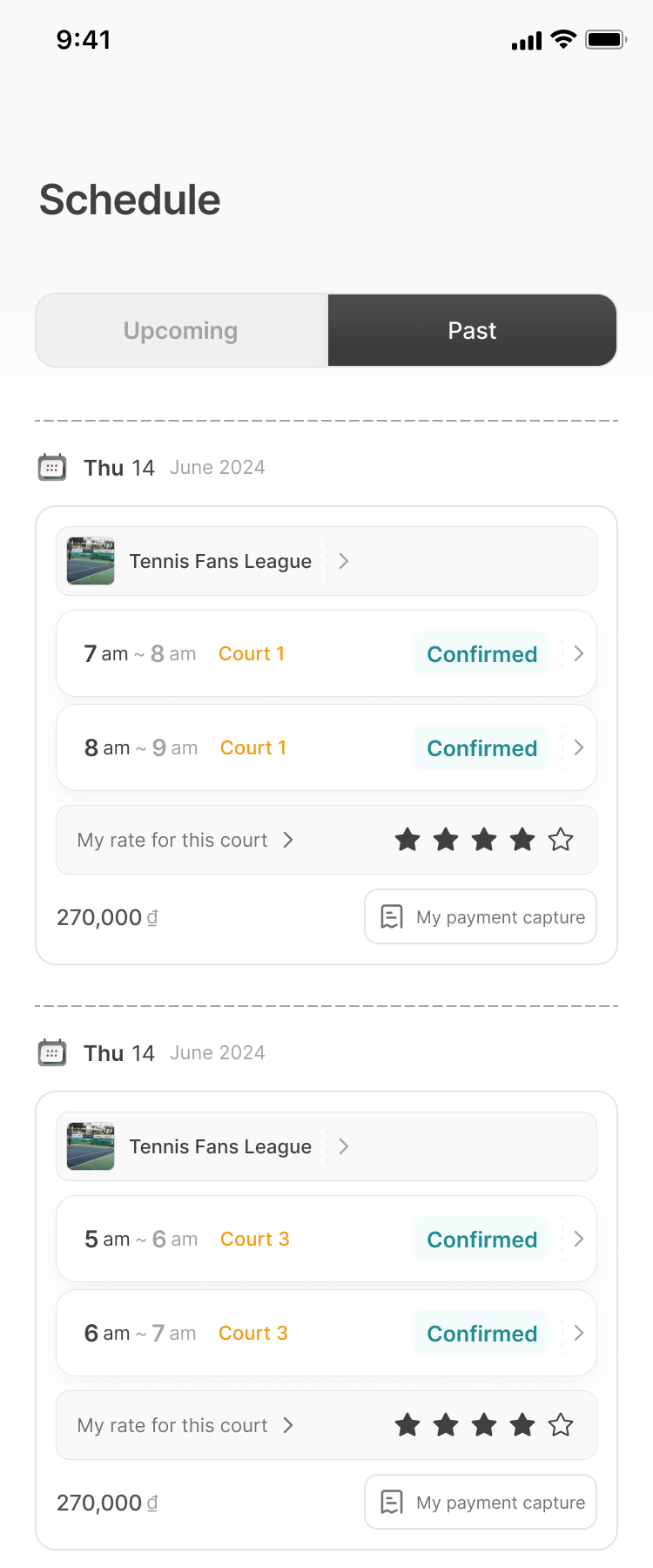 Schedule
08 · How I worked
From written specs to a designer-run release process
Holding the launch
On 21 June 2026, testing on my own phones, I found three booking-state bugs: a venue could still accept a change request the player had withdrawn, a double-tapped cancel sent duplicate notifications, and the venue schedule kept a stale row. Hiddit holds no money, so trust rests on both sides seeing the same, correct state. I postponed the public launch and asked for root-cause fixes that would stop these bugs from coming back.
Now a booking change either completes fully or not at all, and two players can never hold the same court-hour. A week earlier I had also replaced a silent failure: a player who tries to book a court someone else just took now sees "Sorry, somebody already took the court" instead of a spinner that stops. The public launch followed three months later, after security and quality audits. The player app was already on the App Store and reached Google Play during the hold; only the public launch waited.
Speed got the same attention. Loading states use skeletons shaped like the content they stand in for, built to my spec: a 1.5-second shimmer in a violet-tinted gray, a 0.25-second fade-in, and a busy state for screen readers. They now cover eight screens.
Directing a remote team, 2024–2026
I don't write code. Developers from three outsourced engagements built the four codebases from my designs and specs. Remote developers build what is written down, so I wrote specs as state inventories and if/then rules next to each frame, including what an action changes in the other app. The booking card alone has eight states.
Taking over with AI coding agents, 2026
When the last engagement ended in May 2026, designed features sat in the backlog and the code had no automated tests. I kept shipping by running development with AI coding agents, and built gates around what I can't read myself:
- MeDesign in Figma and settle the open questions before any code: states, rules, edge cases
- AgentBuild it as a pull request with tests, citing the Figma frame where there is one
- AI reviewAn automated code reviewer checks every pull request; each finding is verified against the code
- MeMerge, approve each release, and check UI changes on my own phones against the Figma frame
About 490 pull requests went through this between late May and September 2026. Features that span the backend and both apps, like booking approval and Hiddit coupons, went from sign-off to live in five days. Approval went out to both apps switched off, and one server switch then turned it on.
The loop improved as I used it. A selected-court pill once went through three versions in one day: the second fixed four details I caught by putting my phone next to the Figma frame, and the third was my own redesign after the second still felt awkward. For the next screen we changed the process. The agent put my device screenshot and the Figma values side by side in one table, and I settled six open spec questions before any code was written. That screen shipped with a single follow-up fix after my device check.
Speed cost me once. During the approval rollout, a database change I ran by hand went to the wrong database and broke three venue-app screens for four days. It happened before launch, on test data. Since then, database changes are verified against the running service instead of trusted from the console output.
09 · Results & learnings
What shipped, and what I learned
Shipped
Player and venue apps on iOS and Android and an admin console, publicly launched in September 2026. The player app speaks Vietnamese, English and Korean.
A shared booking truth
One lifecycle (Requested, then Confirmed or Failed), shown the same way in both apps, with bounded waits and plain recovery states.
Explicit policies
Ranking, coupon validity and district rules are written down as rules that can be tested and changed.
A process that fits one designer
Specs, decision checklists and device checks against Figma, first with a remote team and then with AI agents.
The business is still being proven. Venue supply is the bottleneck, and better search for players doesn't unlock it on its own. Hiddit launched in September 2026, so it is too early for usage numbers that mean anything.
The biggest recurring flow sits outside every app. Regulars renew next month's slots over Zalo, and the venue retypes them into its booking tool.
From what I've seen at courts, that is mostly badminton; pickleball has fewer regulars. Hiddit's member list only sees players who booked through Hiddit, so it misses the regulars venues care about most. Looking back, the survey hinted at the limit too: about half of respondents (25 of 53) said easier booking wouldn't change how often they play. Most already played twice a week or more, which leaves little room to play more often.
What I'd do differently
- Test whether venues will commit before designing a hundred screens. The owner check had already shown half saw no need.
- Put product analytics in from day one. With none in the apps, the first sign-up journeys had to be rebuilt from server logs.
- Run task-based usability tests early, instead of a survey after the home screen was built.
- Agree on the confirmation model with venues up front. I pitched request-and-accept in 2024, specified instant confirmation for the first build, and rebuilt approval in 2026.
- Make automated tests part of every development contract.
Next
- A helper for regular bookings: a renewal link for the group organizer and a monthly board for the venue, alongside its existing tool. The first step I'm weighing is running one month's renewals by hand with two or three badminton venues before building anything.
- Automatic coupons after a set number of visits. In the survey, 40 of the 52 who answered said visit coupons would make them more likely to return to the same court.
- A task-based comparison with Alobo: the same tasks in both apps with 20–30 players, measuring time and success.